BeagleBone Black Usage
The Beaglebone Black has a 3.3V serial port on the J1 header. You can use this port to run a serial console, allowing you to view boot/kernel messages and also log in.
The serial port settings for the terminal emulator are 115200/8N1, no handshaking.
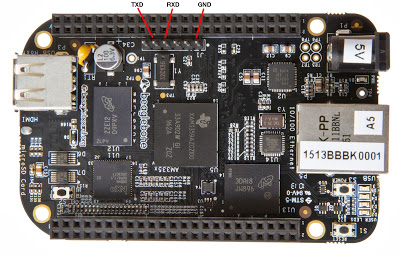
Configure the Debug Buddy for 3.3V RS232 mode by removing both sets of jumper wires. Then connect the BeagleBone Black to the Debug Buddy using three wires, as follows:
Connections
| Debug Buddy | Beaglebone Black J1 Connector |
|---|---|
| TXD J7 pin 1 | RXD pin 4 |
| RXD J7 pin 2 | TXD pin 5 |
| GND (any J2 pin or the black test point loop) |
GND pin 1 |